
Steam Frame: Valve’s New VR Headset, Price, Specs and What Makes It Different
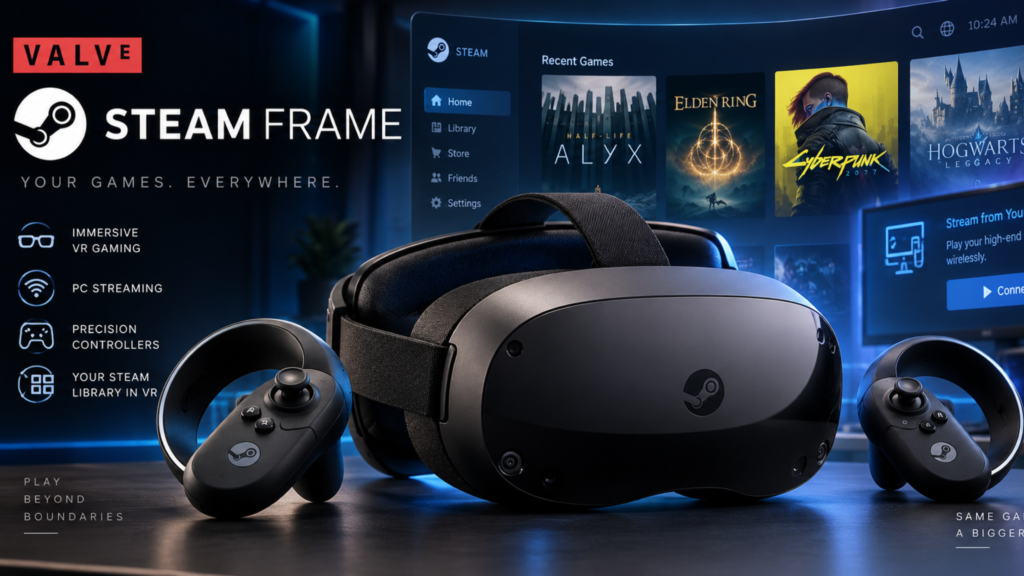
Valve’s Steam Frame is now officially here, giving PC gamers and VR enthusiasts a new way to access Steam games without being permanently tethered to a computer. Unlike the Valve Index, the Steam Frame is designed as a wireless, standalone SteamOS headset that can also stream demanding PC games over a dedicated wireless connection.
The biggest catch is the price. Valve has launched the 256GB Steam Frame at $1,059, while the 1TB version costs $1,299. The headset combines a Snapdragon 8 Gen 3 processor, 16GB of memory, 2160 x 2160 resolution per eye, eye tracking and SteamOS. It can run some games directly on the headset while streaming more demanding titles from a PC or compatible Steam hardware.
What Is the Steam Frame?
The Steam Frame is Valve’s new standalone VR headset and the company’s first major VR hardware release since the Valve Index, which launched in 2019.
Valve announced the device in November 2025 as part of a broader new Steam hardware lineup that also included the Steam Machine and Steam Controller. The company’s goal with the Frame is different from simply creating another VR headset. It is designed to bring the Steam library into a wireless headset that can operate independently for supported games while also functioning as a high-quality PC streaming device.
That makes the Steam Frame a hybrid device:
- Standalone VR: Run compatible games directly on the headset.
- Standalone flat-screen gaming: Run supported non-VR Steam games using SteamOS and compatibility technology.
- PC streaming: Stream demanding games from a gaming PC.
- Steam Machine streaming: Use Valve’s living-room hardware as a remote gaming source.
- Portable Steam environment: Access a Steam-focused computing platform without carrying a traditional PC.
Steam Frame Price and Availability
Valve’s two configurations are:
| Model | Price | Storage |
| Steam Frame | $1,059 | 256GB |
| Steam Frame | $1,299 | 1TB |
Both configurations use the same Snapdragon 8 Gen 3 processor and 16GB of unified LPDDR5X memory. The primary difference is storage capacity.
Valve is using a reservation and selection process for the initial purchasing period rather than simply opening unlimited orders. According to current launch information, reservation sign-ups run through September 17, with selected customers able to purchase beginning September 18.
The pricing is notable because the original Valve Index launched at $999 for its full kit. The Steam Frame therefore sits firmly in premium VR territory rather than competing directly with mainstream standalone headsets on price.
Steam Frame Specs
The core specifications make it clear that Valve is targeting enthusiasts rather than casual VR users.
| Specification | Steam Frame |
| Processor | Qualcomm Snapdragon 8 Gen 3 |
| Memory | 16GB LPDDR5X |
| Storage | 256GB or 1TB |
| Expandable storage | microSD |
| Display | Dual LCD |
| Resolution | 2160 x 2160 per eye |
| Refresh rate | Up to 144Hz experimental |
| Optics | Pancake lenses |
| Field of view | Up to 110 degrees |
| Eye tracking | Yes |
| Tracking | Inside-out |
| Wireless | Wi-Fi 7 |
| Battery | 21.6Wh |
| Operating system | SteamOS |
| Weight | About 440g with strap |
The headset’s front module weighs around 185 grams, while the complete unit with the strap, battery and facial interface is around 440 grams.
Why Eye Tracking Matters
One of the Steam Frame’s most interesting technologies is eye tracking.
Valve uses eye tracking to enable foveated streaming. Instead of sending maximum-quality visual information equally across the entire image, the system can prioritize the area where the player is looking.
That matters because wireless VR streaming requires moving a large amount of visual data between a computer and the headset.
By concentrating higher detail where the user’s eyes are focused, Valve can potentially reduce bandwidth requirements while maintaining a sharper image in the viewer’s central vision.
The technique is particularly important for the Steam Frame because Valve has designed the headset around wireless PC streaming rather than treating streaming as an optional extra.
How Does Steam Frame Run PC Games?
The Steam Frame can connect wirelessly to a PC using the included wireless adapter.
This allows demanding PC VR games to run on the computer while the headset receives the rendered experience wirelessly. Valve also supports a broader range of non-VR PC games through its software stack.
This is one of the biggest differences between the Steam Frame and a conventional standalone headset.
A standalone Snapdragon processor cannot match a powerful desktop gaming GPU. Instead of trying to eliminate that limitation entirely, Valve gives users two approaches:
Run locally when possible. Stream when more power is needed.
That approach can make the Frame much more versatile than a headset that is restricted to its mobile processor.
Steam Frame Can Run Games Without a PC
The Frame is not simply a wireless monitor for your gaming computer.
Its Snapdragon 8 Gen 3 processor and 16GB of memory allow it to run compatible software directly. Valve has also developed technology to make traditional PC games work on the ARM-based SteamOS hardware.
This is particularly interesting because Steam’s PC ecosystem is dominated by x86 processors, while the Steam Frame uses an ARM-based Qualcomm chip.
Valve uses translation and compatibility technologies to bridge that difference.
The result is a device that can run a selection of VR and traditional games locally, although compatibility and performance vary between titles.
Half-Life: Alyx Is a Major Demonstration
Valve has specifically brought Half-Life: Alyx to the Steam Frame.
The original game was designed as a demanding PC VR title. Valve created an ARM64 version that can run directly on the Snapdragon-powered headset. The port also supports existing modifications and saves, according to Valve’s development work described at launch.
That makes Alyx an important technical demonstration.
Rather than requiring a high-end PC to render the game, the Steam Frame can run a specially optimized version locally. It also demonstrates how Valve’s work on Vulkan drivers, SteamOS and its compatibility layers could benefit other software over time.
A copy of Half-Life: Alyx is included with the Steam Frame.
Steam Frame vs. Valve Index
The Steam Frame is not simply an updated Valve Index.
| Feature | Steam Frame | Valve Index |
| Launch era | 2026 | 2019 |
| Standalone operation | Yes | No |
| Wireless PC streaming | Yes | No, third-party solutions required |
| Processor | Snapdragon 8 Gen 3 | Requires external PC |
| Display | 2160 x 2160 per eye | 1440 x 1600 per eye |
| Eye tracking | Yes | No |
| Base stations | No | Yes |
| Operating system | SteamOS | PC-based SteamVR |
| Main concept | Standalone + streaming | PC VR |
The Index remains an important product in Valve’s VR history, but the Frame represents a fundamental change in philosophy.
Valve is no longer asking users to build their VR setup around a gaming PC, external tracking stations and cables.
Steam Frame vs. Meta Quest 3
The more relevant comparison for many buyers is the Meta Quest 3.
The Quest 3 is substantially cheaper and has several advantages, including color passthrough and built-in hand tracking. The Steam Frame counters with higher memory capacity, higher per-eye resolution, eye tracking, SteamOS integration and a stronger emphasis on wireless PC gaming.
The choice therefore depends heavily on how you plan to use the headset.
Choose Quest 3 if you prioritize:
- Lower cost
- Standalone VR
- Color mixed reality
- Hand tracking
- A broad consumer VR ecosystem
Steam Frame makes more sense if you prioritize:
- Steam library integration
- PC VR streaming
- SteamOS
- Eye-tracked foveated streaming
- High-resolution displays
- Valve’s hardware ecosystem
- Running selected PC games without a traditional PC
The Steam Frame is not necessarily the better headset for everyone. It is a more specialized product aimed at people who already have a strong interest in Steam and PC gaming.
What Are the Biggest Drawbacks?
The Steam Frame’s hardware is ambitious, but the launch also comes with several compromises.
High price
At $1,059, the base model costs more than mainstream standalone VR headsets.
The 1TB version pushes the price to $1,299, making the Frame a substantial investment before adding optional accessories.
Battery life
Battery capacity is 21.6Wh, but actual runtime depends heavily on what the headset is doing. Standalone gaming, wireless streaming and display settings can produce very different power demands. Early testing has reported roughly one to four hours depending on workload and usage.
No color passthrough
Unlike the Quest 3, the Steam Frame uses monochrome external cameras rather than a conventional color passthrough system. That makes it less compelling as a mixed-reality device.
Compatibility varies
The Frame can run more than a conventional standalone VR headset, but not every PC game will run perfectly on the ARM-based hardware.
Streaming remains the preferred solution for demanding games that are not suitable for local execution.
Is the Steam Frame a Steam Deck for VR?
That comparison is tempting, but it is not quite accurate.
The Steam Deck is fundamentally a handheld gaming computer with built-in controls and a screen. The Steam Frame is a spatial computing device built around VR displays, motion tracking and wireless connectivity.
But there is a shared philosophy.
Both products attempt to make the traditional PC gaming ecosystem feel more like a console. Valve controls the hardware, operating system and Steam interface while leaving users with considerable flexibility over the software.
The Frame extends that philosophy into VR and wearable computing.
What Does Steam Frame Mean for PC Gaming?
The most interesting part of the Steam Frame may not be the headset itself.
Valve is effectively testing how far a SteamOS-based ARM device can go when combined with compatibility layers, wireless streaming and modern rendering techniques.
If that approach works well, it could eventually influence more than VR.
The company is demonstrating that a device does not necessarily need a desktop-class processor to provide access to demanding PC software. It can combine local execution, translation and remote rendering depending on the workload.
That is a potentially important direction for future gaming hardware.
Should You Buy the Steam Frame?
For a dedicated PC gamer or VR enthusiast who wants a premium wireless Steam experience, the Steam Frame is an interesting proposition.
For a casual VR buyer, the value proposition is much harder to justify.
The key questions to ask are:
- Do you already have a substantial Steam library?
- Do you own a gaming PC capable of high-quality VR streaming?
- Do you want to play both VR and traditional games in a headset?
- Is eye-tracked wireless streaming important to you?
- Are you comfortable paying more than $1,000 for a VR device?
If most answers are yes, the Frame’s unusual combination of features may justify its price.
If not, a less expensive standalone headset may offer a better overall value.
The Bottom Line
The Steam Frame is Valve’s attempt to rethink what a VR headset can be. Rather than focusing exclusively on standalone VR or requiring a wired gaming PC, it combines SteamOS, standalone gaming, wireless PC streaming and eye-tracked rendering in one device.
Its $1,059 starting price makes it an enthusiast product, but the hardware is distinctive: a Snapdragon 8 Gen 3, 16GB of memory, 2160 x 2160 displays per eye, eye tracking, Wi-Fi 7 and support for both VR and traditional Steam games.
The most important question now is whether Valve can make that flexibility reliable enough to justify the premium price. If the software ecosystem develops alongside the hardware, Steam Frame could become more than another VR headset. It could become a new way of accessing the PC gaming ecosystem.